I denna laboration konfigurerar du en utökad ACL (extended ACL) som tillåter HTTP– och HTTPS-trafik över TCP från nätverket 192.168.10.0/24 till valfri destination. Övrig IPv4-trafik som kommer in till routern från detta LAN blockeras av ACL implicita avslutande nekanderegel.
En utökad ACL kan filtrera trafik utifrån källadress, destinationsadress, protokoll och TCP- eller UDP-portnummer. Det gör det möjligt att tillåta vissa typer av trafik och blockera andra.
Med frågetecknet ? kan du visa vilka alternativ som är tillgängliga när du skriver ett kommando. Följande kommando visar bland annat alternativen icmp, ip, tcp och udp.
Alternativet ip omfattar all IPv4-trafik:
R1(config)# access-list 110 permit ?
Om du väljer TCP kan du ange ett portnummer eller ett tjänstenamn. Följande kommando visar tillgängliga alternativ för destinationsporten:
R1(config)# access-list 110 permit tcp any any eq ?
Exempel på internet-tjänster är:
| Tjänst | Portnummer | Användning |
|---|---|---|
| domain | 53 | DNS |
| ftp | 21 | FTP kontrollanslutning |
| ftp-data | 20 | Dataöverföring vid aktiv FTP |
| pop3 | 110 | Hämtning av e-post |
| smtp | 25 | Överföring av e-post |
| telnet | 23 | Fjärrinloggning |
| www | 80 | HTTP |
För HTTPS använder du portnummer 443. Vilka tjänstenamn som visas kan variera mellan IOS-versioner.
Utökade ACL placeras vanligtvis så nära källan som möjligt, så att oönskad trafik stoppas innan den passerar genom resten av nätverket. Därför tillämpas ACL 110 inkommande (in) på R1 interface G0/0/0, som är anslutet till LAN 10. Paketen granskas då när de kommer från LAN 10 in till R1.
Nätverkstopologi
Nätverkstopologin har jag byggt upp med routrar av modellen 433 och har lagt modulen NIM-2T. Routing via EIGRP.
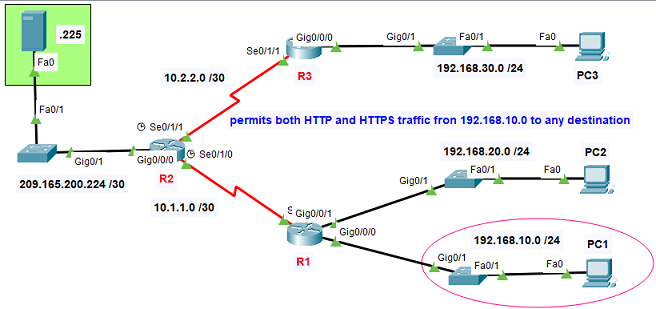
Konfigurationer
- Router> enable
- Router# configure terminal
- Router(config)# hostname R1
- R1(config)# no ip domain-lookup
- R1(config)# interface Gig 0/0/0
- R1(config-if)# description Connected to LAN 10
- R1(config-if)# ip address 192.168.10.254 255.255.255.0
- R1(config-if)# duplex auto
- R1(config-if)# speed auto
- R1(config-if)# no shutdown
- R1(config-if)# exit
- R1(config)# interface Gig 0/0/1
- R1(config-if)# description Connected to LAN 20
- R1(config-if)# ip address 192.168.20.254 255.255.255.0
- R1(config-if)# duplex auto
- R1(config-if)# speed auto
- R1(config-if)# no shutdown
- R1(config-if)# exit
- R1(config)# interface Se0/1/0
- R1(config-if)# description Connected to R2
- R1(config-if)# ip address 10.1.1.1 255.255.255.252
- R1(config-if)# no shutdown
- R1(config-if)# exit
- !
- R1(config)# router eigrp 100
- R1(config-router)# network 192.168.10.0
- R1(config-router)# network 192.168.20.0
- R1(config-router)# network 10.1.1.0
- R1(config-router)# end
- R1#
- Router> enable
- Router# configure terminal
- Router(config)# hostname R2
- R2(config)# no ip domain-lookup
- R2(config)# interface Gig 0/0/0
- R2(config-if)# description Connected to ISP
- R2(config-if)# ip address 209.165.200.226 255.255.255.252
- R2(config-if)# duplex auto
- R2(config-if)# speed auto
- R2(config-if)# no shutdown
- R2(config-if)# exit
- R2(config)# interface Gig 0/0/1
- R2(config-if)# no ip address
- R2(config-if)# duplex auto
- R2(config-if)# speed auto
- R2(config-if)# shutdown
- R2(config-if)# exit
- R2(config)# interface Se0/1/0
- R2(config-if)# description DCE connected to R1
- R2(config-if)# clock rate 4000000
- R2(config-if)# ip address 10.1.1.2 255.255.255.252
- R2(config-if)# no shutdown
- R2(config-if)# exit
- R2(config)# interface Se0/1/1
- R2(config-if)# description DCE connected to R3
- R2(config-if)# clock rate 4000000
- R2(config-if)# ip address 10.2.2.2 255.255.255.252
- R2(config-if)# no shutdown
- R2(config-if)# exit
- R2(config)# router eigrp 100
- R2(config-router)# passive-interface Gig 0/0/1
- R2(config-router)# network 10.1.1.0
- R2(config-router)# network 10.2.2.0
- R2(config-router)# network 209.165.200.224
- R2(config-router)# end
- R2#
- Router> enable
- Router# configure terminal
- Router(config9# hostname R3
- R3(config)# no ip domain-lookup
- R3(config)# interface Gig 0/0/0
- R3(config-if)# description Connected to LAN 30
- R3(config-if)# ip address 192.168.30.254 255.255.255.0
- R3(config-if)# duplex auto
- R3(config-if)# speed auto
- R3(config-if)# no shutdown
- R3(config-if)# exit
- R3(config)# interface Gig 0/0/1
- R3(config-if)# no ip address
- R3(config-if)# duplex auto
- R3(config-if)# speed auto
- R3(config-if)# shutdown
- R3(config-if)# exit
- R3(config)# interface Se0/1/1
- R3(config-if)# description Connected to R2
- R3(config-if)# ip address 10.2.2.1 255.255.255.252
- R3(config-if)# no shutdown
- R3(config-if)# exit
- R3(config)# router eigrp 100
- R3(config-router)# passive-interface Gig 0/0/1
- R3(config-router)# network 10.1.1.0
- R3(config-router)# network 192.168.30.0
- R3(config-router)# end
- R3#
- R1(config)# access-list 110 permit tcp 192.168.10.0 0.0.0.255 any eq www
- R1(config)# access-list 110 permit tcp 192.168.10.0 0.0.0.255 any eq 443
- R1(config)# interface g0/0/0
- R1(config-if)# ip access-group 110 in
- R1(config-if)# end
- R1# show ip interface Gig 0/0/0
- R1# show ip interface Gig 0/0/0 | include access list
- R1# show access-lists
- R1# show running-config | begin ip access-list